Version releases
We are constantly adding new features to Procountor API. This page has the planned changes in future releases as well as release notes for the current ones. For anyone interested, we recommend subscribing to our mailing list to get notifications about API changes as soon as they become available.
Currently available API versions
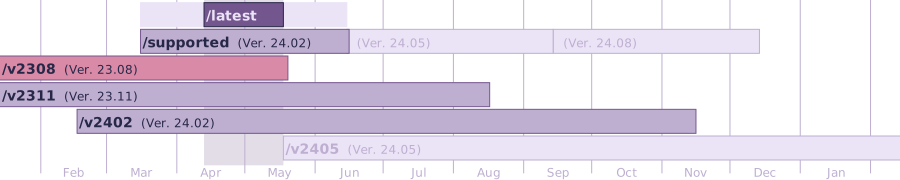
| API Path | Version | Release Date | Support Ends |
|---|---|---|---|
/latest |
Monthly release with no extended support. However, if new API version isn't released, it will continue to have the previous release | ||
/supported |
25.08 | Updated to the latest numbered version every three months | |
/v2511 |
25.11 | 2025-11-15 | mid-Aug 2026 |
/v2508 |
25.08 | 2025-08-16 | mid-May 2026 |
/v2505 |
25.05 | 2025-05-24 | mid-Feb 2026 |
You can find the version update schedule from Procountor news and announcements site.
Release notes
Changes highlighted in red are not backwards compatible
Changes in version 25.11
Endpoints
New endpoints
We have created a new endpoint GET /mfatransactionresult/{transactionIdentifier}
- This endpoint replaces multiple existing confirmation endpoints which are marked as deprecated:
PUT /users/{transactionIdentifier}/confirmPUT /invoices/{transactionIdentifier}/confirmPUT /payments/directsalarypayments/{transactionIdentifier}/confirmPUT /payments/directbanktransfers/{transactionIdentifier}/confirmPUT /payments/{transactionIdentifier}/confirm
- These existing endpoints have been marked as
PUTbut they have been functioning asGETendpoints, so there is no change in the functionality itself. - The response model for the new endpoint has been improved. There is a separate field for each response model type and only one field is returned, according of transaction type. Please check OpenAPI documentation for further information.
With a new endpoint PUT /products/{id}/defaults/dimensions/{dimensionId} it is now possible to add default dimensions to products.
- Dimensions can be added to products by using
PUT /products/{productId}/defaults/dimensions/{dimensionId} - Fetching the default dimensions of products can be done with endpoints
GET /products/{id}/defaults/dimensions/{dimensionId}andGET /products/{id}/defaults/dimensions. - The validation logic within the endpoints is following the Procountor UI:
- percent sum has to be 100%
- names cannot be duplicated for items
- item name has to be correct
- product for the added default dimension has to exist
Improvements
A new field partnerId has been added to the endpoint GET /ledgerreceipts/{receiptId}
- This should help API users to stay on track i.e. in cases where a business partner has been changed on the invoice, but not on the ledger receipt.
- If a ledger receipt is linked to an invoice, the business partner id from the linked invoice is displayed in
GET /ledgerreceipts/{id}aspartnerIdfield. - Sometimes the
partnerIdfield withGET /ledgerreceipts/{id}may also return resultnull, i.e. if the ledger receipt is not linked to an invoice, or the business partner'spartnerIdon the invoice isnullif the business partner has not been created to the business partner register (partnerIdnot given).
- If a ledger receipt is linked to an invoice, the business partner id from the linked invoice is displayed in
Improved endpoint specification for GET /invoices
- API reference for
GET /invoicesendpoint has been updated. - For most of the addresses
namein API is not required. The field name has been marked as required only in:InvoiceCounterpartyAddressPaymentRecipientNameAndAddress
- Description about sales and sales order invoices is displayed only for invoice address:
InvoiceBillingAddressInvoiceCounterpartyAddress
A new field added to GET /products and GET /products/{id}
- A new field
versionhas been added toGET /productsandGET /products/{id}response bodies alongside with a possibility to search byversionStartDateandversionEndDateandorderByVersionwithGET /products. - The change enables API users to detect when a product's information has been modified and enable searching only modified products.
New optional field
-
We have added optional field
bccAddressesincounterPartyin the following Invoices API endpoints:- GET /invoices
- POST /invoices
- GET /invoice/{invoiceId}
- PUT /invoice/{invoiceId}
-
And in these BusinessPartners API endpoints,
bccAddressesis added toinvoicingInfo- POST /businesspartners
- GET /businesspartners/{id}
- PUT /businesspartners/{id}
- PATCH /businesspartners/{id}
-
bccAddressesfield is supported only in sales invoice, sales order and offer with these validations- Maximum 4 email addresses can be provided
- Must not be the same as the main email address
- Each Bcc address must be free of special characters and no longer than 256 characters
General
Improved usability with Procountor API activation
- Procountor API activation “state” parameter delivered with the callback URL.
- We have added a “state” parameter to the API activation callback URL to be passed on, so that when activating Procountor API our integrators are able to direct their users to the right state and environment between their system and Procountor API activation system.
- The feature is in use automatically when using the newer API activation flow.
Tax card information
- Starting in Procountor version 107, tax cards now have income types. In the Procountor API, they can be left out of tax card related queries, which in interpreted as tax card not having a set income type. If they are present, they are given as a String in same form that VeroApi handles them. Values that Procountor API handles are "000024" - "000040", "000042".
- Tax card income types are used when selecting what tax card to use when creating salary slips. The selection is made based on a selection made in salary info view. This selection is coming to the Procountor API in the future. The default is the old behavior.
- VeroApi documentation: https://api-developer.vero.fi/api-details#api=IIT&operation=postGetWithholdingPercentage
Payroll API
Changes to existing endpoints
- We have added new tax card income type and class has been updated to contain the new incomeType variable.
- Income type is not mandatory, and it can be left out or set as null.
- If incomeType is given it needs to be 00000, 000024-000040, 000042 or otherwise, an error is given that says the given value is unexpected, 400 error code.
- Tax-At-Source tax cards do not have an income type, so assigning any should end in 400 error code with message “Invalid tax card income type”
- The change concerns following endpoints:
GET/payrolls/employees/{id}/salaryinfo/taxcardsPOST/payrolls/employees/{id}/salaryinfo/taxcardsGET/payrolls/employees/{id}/salaryinfo/taxcards/{taxCardId}PUT/payrolls/employees/{id}/salaryinfo/taxcards/{taxCardId}DELETE/payrolls/employees/{id}/salaryinfo/taxcards/{taxCardId}
Changes in version 25.10
Endpoints
New Payroll features
We have improved the Payroll API with following changes:
-
With the new endpoint
PUT /payrolls/salaryslips/{id}/cancelapprovalcustomers are now able to cancel the approval of a salary slip through the API.- The new endpoint cancels approvement from the salary slip with given salary slip ID. Only salary slips with status
APPROVEDcan be handled with the endpoint.
- The new endpoint cancels approvement from the salary slip with given salary slip ID. Only salary slips with status
-
Existing endpoint
PUT /payrolls/salaryslips/{id}improvements- We have synchronized the additional base salary type's quantity to match with the main salary type's quantity when the salary type is added as a new entry through the API.
- New salary row of salary type's 2411 Sick leave wage – monthly positive quantity value will now match together with the additional base salary row 1017, deductions from base salary, sick leave pay negative quantity value.
- Also new salary rows of Overtime salary types (1230-1239) quantity values and related additional base salary row 1220 - Overtime compensation base hourly salary or 1221 - Overtime compensation base monthly salary quantity values will now match.
- On Prcountor UI there is no link/syncronisation for main and additional base salary row and the default Qty is always 1.
- The customer benefit is that Payroll clerks don't need to do manual adjustments when paying sick leave or overtime salary through the API, because:
- New salary rows with Sick leave pay 2411 quantity value will now match with the base salary deduction row 1017 negative quantity value.
- New salary rows with Overtime salary types 1230-1239 quantity now matches with the overtime compensation base salary type 1220 or 1221 quantity value
Changes in version 25.09
Endpoints
New Payroll features
As part of the Payroll API we are introducing changes to existing endpoints
-
New features with endpoint
PUT /payrolls/salaryslips/{id}- We have added support for modifying working hour reduction rows with quantity within the ranges allowed by earned hours/days during the whr periodic setting, unit value within commonly allowed ranges. Correction e.g. unjust enrichment and recovery is not supported.
- We have added support for modifying holiday/holiday bonus/additional leave days rows as on the UI - quantity, unit value (for monthly), holiday days spent (for monthly workday). Correction e.g. unjust enrichment and recovery is not supported.
- Support for changing salary slip's payday
-
New feature with endpoint
POST /payrolls/salarylists- Possibility to pay working hour reduction
Paying working hour reduction will take place with automation so that it is only needed to provide payable amount of days or hours, and Procountor will distribute these days/hours to different (if there is) year's remaining days/hours starting from the oldest remaining working hour reduction days/hours. Both workingHourReductionHours and workingHourReductionDays must be positive or omitted (null), not 0.
Other endpoints
-
GET /companyendpoint.It is now possible to fetch the company currency and currency rate search density in the
GET /companyendpoint response. This enhancement provides additional details about the company's financial settings. The new fields can be found in the response payload of theGET /companyAPI. To use this functionality, simply call theGET /companyendpoint, and the response will include thecompanyCurrencyandcurrencyRateSearchDensityfields.
Changes in version 25.08
Endpoints
Breaking changes:
-
POST /bankaccounts -
PUT /bankaccounts/{id}Background:
Holvi bank connection is planned to be released on version 104. If user had Holvi bank account before the release 104 date, they are marked as "old Holvi customer". Old Holvi customer can't use payment features.
Summary:
Now we restrict the conditions while creating and updating Holvi bank account. This applies only for old Holvi bank customers. If any of the payment features are chosen, the request will be turned down with
400status code with descriptionInvalid argument. Bank account is not allowed for payment methods.Restricted payment features:
allowPaymentsallowForeignPaymentsallowSalaryPaymentsallowExpressPaymentsdefaultForPayment
Reason:
Holvi bank payment features are not supported for old Holvi customers. Contact cutomer service to remove that special right and enable payment features.
How to use it:
If you are old Holvi customer, you need to set as false all payment features listed above.
New Payroll endpoint
As part of the Payroll API we are introducing new endpoints:
-
PUT /payrolls/salaryslips/{id}/approvethis endpoint approves salary slip with given salary slip ID in case there are no contraindications / validation failures for a slip to be approved. -
GET/payrolls/salaryslips/{id}/accountingfetches accounting for given salary slip ID -
PUT/payrolls/salaryslips/{id}/accountingpossible to update accounting data for given salary slip ID and especially possible to create and update dimension entries.Salary slip needs to be first approved with
PUT /payrolls/salaryslips/{id}/approveendpoint before it is possible to fetch accounting details withGET/payrolls/salaryslips/{id}/accountingendpoint, and then it is possible to update accounting details for example dimensions by usingPUT/payrolls/salaryslips/{id}/accountingendpoint. Principle is the same as when updating dimensions for the invoices withPUT /ledgerreceipts/{receiptId}/transactions/{transactionId}/dimensions
New endpoints
-
GET /vats/settingsto retrieve company VAT settings:isUnitPricesIncludeVatSalesspecifies if VAT is included in sales invoice products by default.isUnitPricesIncludeVatPurchasespecifies if VAT is included in purchase invoice products by default.
-
GET /company/usagesettingsto retrieve company usage settings. This endpoint provides detailed information about the company's usage settings, including:defaultInvoiceChannelspecifies the default method for sending invoices (e.g., email, mail, electronic invoice etc.).cashDiscountsettings indicates whether cash discounts are applied for sales and purchase invoices.accountingByRowsettings provides details on whether posting by row is enabled for sales invoices, purchase invoices, travel and expense invoices, and salaries.
This endpoint requires
Management -> Basic company infoviewing rights.
Changes to existing endpoints:
-
POST /payrolls/salaryslipswe have added more validations for rows -
PUT /payrolls/salaryslips/{id}endpoint currently does not support:- modifying holiday pay rows
- modifying working hour reduction rows
- modifying payday
-
POST /payrolls/salarylistswe have added possibility to pay holiday pay, holiday bonus pay and additional leave days and holiday compensation withPOST/payrolls/salarylists.Paying holiday or holiday bonus pay or additional leave days will take place with automation so that it’s only needed to provide payable amount of days and Procountor will distribute these days to different (if there is) year’s remaining days and also with different calculation basis (if there is) starting from the oldest remaining holiday days. Therefore there is no need to know which salary type needs to be used for paying holiday pay/holiday bonus pay/additional leave days.
With right for time of the payable holiday compensation sum needs to be provided and this sum will be distributed for different holiday credit years starting from the oldest one where is unpaid holiday compensation.
Support for paying working hour reduction with API will be released in September release.
Changes in API documentation
- In the documentation for the
GET /journalsendpoint, all instances of the termjournal invoicehave been replaced with the termjournal receipt.
Changes in version 25.07
Endpoints
New Payroll endpoint
As part of the Payroll API we are introducing a new endpoint
PUT /payrolls/salaryslips/{id}updates salary rows and creates new salary rows to salary slip, which has first been created withPOST /payrolls/salarylistsendpoint.
Forthcoming Payroll API features
- Some not so common validations will be added in the forthcoming release
- Salary slip's payday change will not be supported yet
- Support for paying holiday pay and holiday bonus will be added to the August release for
POST /payrolls/salarylists - Correcting holiday pay and holiday bonus pay will not be supported with API
Other endpoints
- A new
searchTermparameter has been added to theGET /invoicesendpoint.- This allows users to perform a free-text search on invoices.
- The
searchTermcan be used to search bycounterpartyAddress.name,invoiceNumber, andadditionalInformation.
Changes in version 25.06
Endpoints
New Payroll endpoint
As part of the Payroll API we are introducing new endpoint for creating new salary list
-
POST /payrolls/salarylistscreates new salary list and salary slips in it from salary base. -
Working time allocation days are prefilled and calculated from Payment period start and end date, user will be able to adjust them with
PUT /payrolls/salaryslips/{id}endpoint which is planned to be released in July release, then also adding salary slip rows will be possible. - Notes to salary slips are not supported in
POST /payrolls/salarylistsbecause those are not visible in salary list search view anymore.
Fields required in salary list object:
namepaymentPeriodStartpaymentPeriodEndaccountingDatedueDatepaydayemployeesDataForSalarySlip
Optional fields:
earningsPeriodStartholidayYearearningsPeriodEnd
For employee data only employeeId is required, other values can be filled automatically.
Optional fields for employee data:
calendarWorkdaysabsentDayspensionInsuranceContributionPercentunemploymentInsurancePercentaccidentInsurancePercentgroupLifeInsurancePercenthealthCareInsurancePercent
For creating new salary list through API it's possible utilize also new salary period endpoints. These are used to fetch salary period details for salary list creation:
GET /payrolls/salaryperiods- returns a list of basic information about salary period lists for a given holiday credit year (query parameterholidayCreditYearmust be always provided). The endpoint requires at least read rights for salaries.GET /payrolls/salaryperiods/{id}- returns a list of salary periods for a given salary period list ID (path parameter{id}must be provided when fetching)
Other endpoints
- A new endpoint
GET /payments/paymenteventswithinvoiceIdas search parameter has been created- It is possible to search payment events for a batch of 200 invoiceIDs
- An existing endpoint
GET /paymentshas a new search result- It is now possible to see
paidAmountandpaidCurrencyinGET /paymentsresponse
- It is now possible to see
Changes in version 25.05
Endpoints
Breaking changes
- A new validation has been introduced which affects the payment endpoints within Swedish environments:
- Affected endpoints:
POST /paymentsPOST /payments/directbanktransfers
- The validation checks whether
payerBankAccounthas SEK currency when using payment method BankgiroSWEDISH_DOMESTIC_PAYMENT_BANKGIROor PlusgiroSWEDISH_DOMESTIC_PAYMENT_PLUSGIRO. - If the validation fails, the following error code is returned by the endpoints:
ONLY_PAYER_ACCOUNT_WITH_SEK_CURRENCY_IS_SUPPORTED_WITH_BANKGIRO_OR_PLUSGIRO_PAYMENT_METHOD.
- Affected endpoints:
New Payroll endpoint
As part of the Payroll API we are introducing new endpoint regarding salary slip
GET /payrolls/salaryslips/{id}Returns salary slip for given salary slip ID with detailed information of:- Salary slip information (data varies depending on settings):
id,employeeId,employeeName,status,paidStatusDetails,slipNumber,salaryBaseNote,incomesRegisterReportingSetting - If employee has holiday pay/working hour reduction settings on:
workingTimeAllocation,holidaysWorkingTime,workingTimeInFirstMonth,workingTimeInSecondMonth,workingTimeType,averageDailyActualWorkday,actualWorkdaysInFirstYear,actualWorkdaysInSecondYear,workingHourReductionWorkingDays,workingDaysInFirstYear,workingDaysInSecondYear - Salary slip row details:
id,salaryTypeCode,customName,quantity,unitValue,paymentPercent,recoveryDetails,id,netRecoveryTaxValue,paymentPeriodStart,paymentPeriodEnd,earningsPeriodStart,earningsPeriodEnd,payday,taxAtSourceValue - Car benefit details:
id,carAgeGroup,benefitLimited,emissionValue,odometerReading - Other salary row details:
baseSalaryRow,earningsPeriodStart,earningsPeriodEnd,showEarningPeriodInExport,unjustEnrichment,comment - Holiday row details:
holidayCreditYear,holidayPayPercentage,holidayDaysSpent,holidayBonusCalculationBasis,correction - Working hour reduction row details:
year,systemNoticication - Settings:
noObligationExceptionTypes,notSubjectExceptionTypes,pensionVoluntarilyPaid,accountingDate,dueDate,salaryChannel,additionalInformation - Adjustments:
payday,employment,startDate,endDate,type,terminationReason,registrationGroundId - Insurance details:
pensionContractId,accidentInsurancePolicyId - Slip notes
- Version
- Unit, Total, Gross salary and Net salary, Basic information will not be returned, neither are Employer contribution details nor tax days, calendar workdays and absences
- Salary slip information (data varies depending on settings):
Changes to existing Payroll API endpoint results:
GET /payrolls/salarylists/{id}- Workdays has been removed from the results
paidStatusDetailshas been added to results
GET /payrolls/salaryslipspaidStatusDetailshas been added to results
Swedish support for Factoring contracts via API
- We have added new endpoints for the Swedish environments:
GET /se/factoringcontractsendpoint has been added for SE environments so that now it is possible to fetch factoring contracts from Procountor.POST /se/factoringcontractsendpoint has been added for SE environments so that now it is possible to insert factoring contracts to Procountor.
Other endpoints:
-
Updating dimension information on ledger receipts via API
- It is now possible to update dimensions, dimension items and their values with the new endpoint:
PUT /ledgerreceipts/{receiptId}/transactions/{transactionId}/dimensions
- The logic of necessary user rights follow Procountor UI functionalities. I.e. it is possible to modify dimension information even with the user rights limitation "Prevent editing of the accounting page" enabled.
- It is now possible to update dimensions, dimension items and their values with the new endpoint:
-
We have added a new a field to the result set of the endpoint
GET /products?type=TRAVELresponse body- The new field is
bookkeepingAccount. - By using the renewed endpoint it is possible to also fetch the ledger account information that has been set for the travel product.
- The new field is
-
Possibility to allocate and remove payment transactions on bank statement events with invoices via API
- We have added new endpoints
PUT /bankstatements/{statementId}/events/{eventId}/invoices.- It is possible to allocate a payment transaction bank statement event to an invoice by using this endpoint.
DELETE /bankstatements/{statementId}/events/{eventId}/invoices.- It is also possible to remove an allocation between a payment transaction bank statement event and invoice by using this endpoint`.
- We have added new endpoints
-
With endpoints
POST /ledgerreceiptsandPUT /ledgerreceipts/{receiptId}an error message was improved to be more descriptive.- Previously, when ledger account was not found, the endpoint returned
ERROR_LEDGERACCOUNT_VATPERCENTAGE_COMBINATIONerror message. It was a wrong description. - Now the error code was changed to more descriptive
ERROR_LEDGERACCOUNT_NOT_EXIST_OR_INACTIVE. - Validation now also checks if the ledger account is active or not.
- Previously, when ledger account was not found, the endpoint returned
-
New parameters were added for Inventory Management with endpoints
PUT /invoices/{invoiceId}/approveandPUT /invoices/{invoiceId}/unfinished- The endpoint
PUT /invoices/{invoiceId}/approvehas a new parameterupdateInventory- If
updateInventoryis true and the user has necessary user rights for inventory and invoices, the inventory is updated accordingly - If the user doesn't have necessary user rights for inventory management
No access to inventory managementerror message is returned - If the user doesn't have necessary user rights for handling the invoices, the flag is ignored and the inventory will not be updated
- If
- The endpoint
PUT /invoices/{invoiceId}/unfinishedworks so, that if there are products in the inventory management related to the products on the invoice, the inventory management is automatically updated accordingly.
- The endpoint
-
It is now possible to use API for importing comments and messages to bank statement ledger receipts / accounting page transaction description field.
- New field
comment, which can be used to add comments to transaction description field by row, was introduced which is used in following endpoints:PUT /referencepayments/{referencePaymentId}/metadataPUT /bankstatements/{statementId}/events/{eventId}/metadata
- In some cases banks are using the same transaction description field for their messages. On the UI, we trim the messages so that the maximum length of the transaction description is 255 characters. If the bank delivered message is 50 characters and rest of the message is 300 characters, we will show only 205 characters for the rest of the message (255-50=205).
- The new field
commentwas also added for metadata (allocationMetadataRows) for reference payment and banks statements. It is now also supported with GET endpoints:GET /bankstatementsGET /referencepayments
- New field
Changes in version 25.04
Endpoints
Breaking changes
- To align with our naming conventions and ensure consistency, these 2 SIE file endpoints have been renamed:
- from
GET /SIE/availabilitytoGET /sie/availability - from
GET /SIE/filetoGET /sie/file
- from
- When fetching default accounts of a supplier via
GET /businesspartners/{id}/defaults/accountsendpoint, if the user doesn't have any access rights toPURCHASE_SUPPLIER_REGISTER,403 Forbiddenerror is returned instead of404 Not found error. - When trying to set passive dimension item to a ledger receipt transaction with
POST /ledgerreceiptorPUT /ledgerreceipts/{receiptid}endpoints, the error message has been improved and changed to be more descriptive.- The new error message is
DIMENSION_ITEM_IS_PASSIVE_OR_DOES_NOT_EXIST_IN_DIMENSION - The former error message was
DIMENSION_OR_DIMENSION_ITEM_IDENTIFIERS_DOES_NOT_MATCH_THOSE_STORED_IN_DATABASE
- The new error message is
New Payroll endpoints
-
As part of the Payroll API we are introducing new endpoints regarding salary list and salary slip
-
GET /payrolls/salarylists- Returns the list of salary lists with information:
id,name,numbeOfSlips, statuses of the slips belonging to the list,PaymentPeriodStart,PaymentperiodEnd,createdandcreatedby - It is possible to search salary lists by payment period start and end dates and by salary slip’s name
- Pagination and sorting are supported.
- Partial search is supported for name
- Returns the list of salary lists with information:
-
GET /payrolls/salarylists/{id}- Returns salary list with given salary list id with information of salary list and salary slips included in the list. Returned information from the salary slips like:
id,EmployeeName,PaymentPeriodStart,Payday,SlipNumber,statusand so on - Only not invalidated slips will be returned along with the list
- Versioning is supported
- Returns salary list with given salary list id with information of salary list and salary slips included in the list. Returned information from the salary slips like:
-
GET /payrolls/salaryslips- Returns the list of salary slips with information:
id,EmployeeName,PaymentPeriodStart,Payday,SlipNumber,status,slipNotes,salaryChannel,sentStatus,reportStatus,salary,fringe Benefits,salaryForIns,deductionToTaxable,tax,taxableCompensation,taxFreeItems,otherDeductions,netPayandeSalaryStatus - We support salary slip search with: Payday end and star date, Employee name, Salary slip number and Salary slip statuses (new search criterion are not supported)
- Pagination and sorting are supported
- Partial search is supported for employee name
- Returns the list of salary slips with information:
-
-
New validations/functionality to existing Payroll API endpoints:
POST /payrolls/employees/salaryinfo and PUT /payrolls/employees/{id}/salaryinfo- No possibility to uncheck ‘non-resident taxpayer’ when salary base contains 2922 salary type in salary rows.
- Salary base row with salary type 2922 can not be saved without ‘non-resident taxpayer’ configured in salary info.
- API salary info endpoint has constraint, ‘non-resident taxpayer’ can not be switched off when salary base contains salary type 2922 rows.
PUT /payrolls/employees/{id}/salarybase- When user will call API endpoint PUT salarybase and new row which has related row (see RelatedSalaryRow and OvertimeSalaryRowFactory) is added then automatically related rows should be created and saved in salary base.
- Salary types which have related rows available in salary base:
- 2205 → related salary type 1016
- 2411 → related salary type 1017
- Overtime salary types:1230, 1231, 1232, 1233, 1234, 1235, 1236, 1237, 1238, 1239
- Overtime related row:
- if base salary type is hourly → 1220
- for other base salary types → 1221
- This new functionality fallows the same logic than UI in the software.
Changes with other endpoints
-
We are introducing a new endpoint for fetching journal receipts of all statuses:
GET /journals- Supports query parameter
statusesthat accepts one or more statuses separated by comma - Supported statuses are
Unfinished,ApprovedandInvalidated
- Supports query parameter
-
We have added optional support for JPEG/JPG images with endpoint
GET /invoices/{invoiceId}/image- It is now possible to fetch invoice images also in JPEG/JPG format by using an optional query parameter
format - If the query parameter
formatis not used, the invoice image is returned in PNG format by default
- It is now possible to fetch invoice images also in JPEG/JPG format by using an optional query parameter
Improvements with the Easier Integration Activation Process
- We have added a new endpoint
GET /integrations/{integrationId}/customersso that integrators can now check whether their customers are using the new easier API activation flow or not. User sending the request must belong to the company that contains "API Integrator tool", and the environment has to be the owner of the integration represented byintegrationId, otherwise 403 is returned.- Endpoint returns list of
companyIdthat are using the new integration flow and theirintegrationVersionStatus - Please note to migrate to the new integration activation process with an existing integration, you need to submit the form in https://dev.procountor.com/contact/request-migration-to-easier-api-activation/
- Endpoint returns list of
Bug fixes
- A new logic has been implemented for the
PUT /ledgerreceipts/{receiptId}endpoint. When updating a ledger receipt with a reconciliation row and setting thecreateReconciliationparameter to true (createReconciliation=true), the VAT type of the reconciliation row, if left empty, will now be inherited from the main ledger receipt's VAT type. - When editing a reconciliation row for a ledger receipt by calling the
PUT /ledgerreceipts/{receiptId}?createReconciliation=trueendpoint, if the VAT type is left empty, reconciliation row will now automatically inherit the VAT type from the ledger receipt.
Changes in API documentation
In API documentation multipleOf information for penaltyPercent and discountPercent have been removed from the following endpoints:
- GET /invoices/{invoiceId}
- PUT /invoices/{invoiceId}
- POST /invoices
Changes in version 25.03
Endpoints
Breaking changes
- Support for salary category
EMPLOYER_PAYMENTShas been removed fromGET /payrolls/salarytypesendpoint. GET /invoices/{invoiceId}/comments/taggableusersendpoint now checks if the user has rights to the given invoice AND if the invoice specific discussion setting is enabled or not (allowInvoiceSpecificDiscussioninGET /company/invoicecirculation/settingsendpoint). If the validation fails, endpoint returns403error code instead of200successful response.
Introducing A New, Easier Integration Activation Process
- We are excited to announce the release of our new API activation process, designed to streamline and enhance the integration experience for both integrators and the integration users.
- For integrators, this new process offers a seamless way to create, manage, and share integration specifications. You can efficiently enroll new customers into your integrations and handle change management with ease.
- For customers, the new activation process is a game-changer. Integrations can now be activated through a simple self-service flow. By clicking on an “activation link”, specific to each integration, customers are guided through an automated activation process that requires no technical knowledge.
- At the end of a successful integration activation flow:
- A technical user, defined by the integrator in the integration specification, is added to the customer environment(s) with the user role of "API technical user"
- The API key is created for this technical user and shared with the integrator
- User rights for this technical user are set as defined in the integration specification in customer's environment(s)
- "Allow the usage of invoiceable API clients" setting is enabled in customer's environment(s) in Management > Company info > Usage settings
- A confirmation email is sent to the user who initiated the integration activation(s)
- This new activation process will replace the current manual method of setting up integrations, becoming the default method moving forward. Please note that this process is supported only for M2M authentication.
- Additionally, existing integrations can be transitioned to this new process. To start with the migration, please submit this form.
- For more information and detailed instructions please check
- Creating an integration specification - for integrators
- Activating Integrations in Procountor - for customers
New Integrations endpoints in Version 25.03
- The following new endpoints are related to the new integration activation flow mentioned above.
GET /integrations/{requestId}- Returns information on companies looking to activate the integration for the specified
requestId, which is appended in the "Integration callback URL" during the new integration activation flow. - User sending the request must belong to the company that contains API Integrator tool.
requestIdmust be valid. If it has expired,410error is returned.- It's possible to activate integration for multiple companies using the same
requestId. - Information returned in
extraInfodepends on the fields marked as required for user consent in the integration specification.
- Returns information on companies looking to activate the integration for the specified
PUT /integrations/{requestId}- To approve and/or reject integration activation request.
- User sending the request must belong to the company that contains the API Integrator tool.
- Request parameter
requestIdmust be valid. If it has expired,410error is returned. - The number of
companyIdin request body inapproveandrejectcombined must match the number ofcompanyIdreturned inGET /integrations/{requestId}response incompaniesToIntegrate. Otherwise,400is returned. - If the request is successful, a technical user with the "API technical user" role is added to all the approved companies, and an API key for the technical user is generated and returned. If the technical user already belongs to the approved environment (e.g. it has been added manually), its existing API key is returned.
New Payroll Endpoints in Version 25.03
- As part of the Payroll API, we are introducing new endpoints for employees’ salary base:
GET /payrolls/employees/{id}/salarybase- Endpoint for fetching the salary base of the specified employee.
- Salary base should always have at least one salary row in
rows. Some base rows are created automatically and others can be added. Each salary base row consists ofid,salaryTypeCode,customName,quantity,unitValue,paymentPercent,recoveryDetails,carBenefitDetails,baseSalaryRow. - Apart from the salary base row, it also returns
id,employeeId,notes,version.
PUT /payrolls/employees/{id}/salarybase- Endpoint for updating the salary base for the specified employee.
notesand salary base row information can be updated.
Changes to other endpoints in version 25.03
- If the due date of the e-invoice is in the past or the current day, API returns error code
400in these endpoints:POST /invoices,PUT /invoices/{invoiceId},PUT /invoices/{invoiceId}/send - In the following endpoints, if the electronic invoice operator ID is same as electronic invoice address or EDI ID, API returns
400, unless they are same in Tieke register. In the latter case, error code isn't returned.POST /invoicesPUT /invoices/{invoiceId}POST /businesspartnersPUT /businesspartners/{id}PATCH /businesspartners/{id}
Older release notes
Older release notes can be found from their own page.